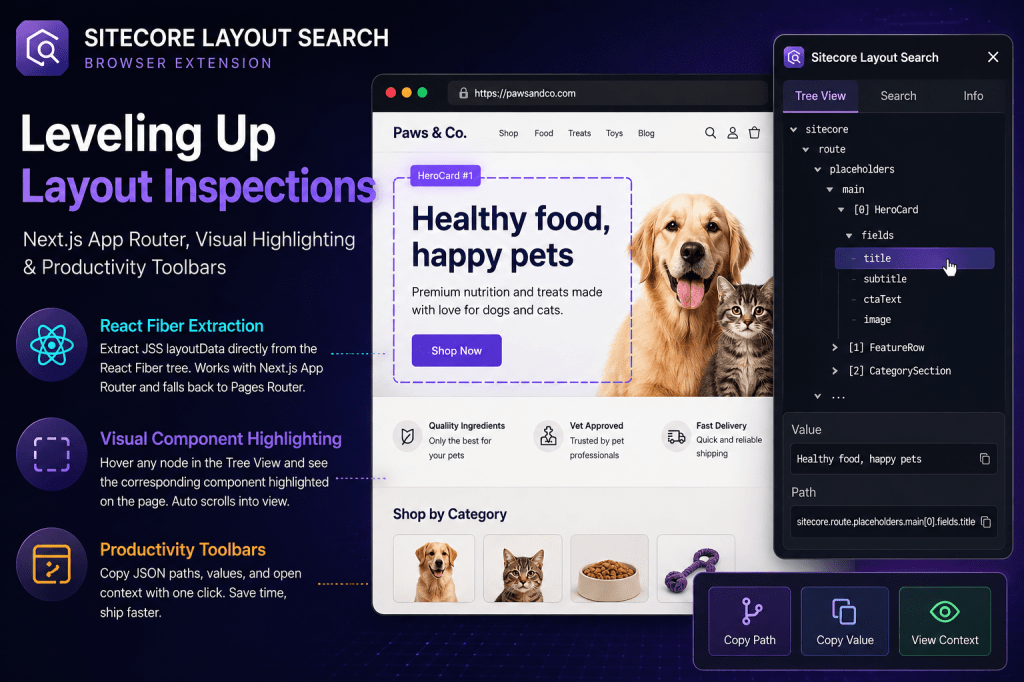
1. The Next.js App Router Revolution: React Fiber Extraction
The Problem
In legacy Next.js Page Router apps, inspecting the page structure was as simple as typing __NEXT_DATA__ in the console. However, Next.js App Router apps stream content using React Server Components (RSC). Layout data is hydrated directly into components like SitecoreProvider or SitecoreContext, leaving the global window object empty.
The Solution
I’ve recently released a major update to the extension, adding support for Next.js App Router layout inspection and introducing three key features:
I implemented an advanced, main-world script (main-world.js) that traverses the live webpage’s React Fiber tree in memory.
- It extracts the JSS
layoutDatadirectly from props and state nodes. - Production-Ready: Bypasses production minification by reading raw JSS rendering descriptors.
- Safety First: Filters out functions and circular references to prevent structured clone exceptions.
- Full Backward Compatibility: Automatically falls back to Pages Router extraction scripts if the page runs on the legacy router.
Extension Link: Sitecore LayoutData Explorer
2. Webpage Component Highlighting (Visual Outliner)
The Feature
Hovering over any node in the Tree View (whether it is the component node itself, or a nested field key like title) draws a dashed purple overlay directly over the corresponding elements on the active browser tab.
- Floating Badges: Displays the name of the component and its index (e.g.,
HeroCard #1). - Smart Scroll-into-View: Automatically scrolls components into view smoothly if they are currently offscreen.
- Auto-Cleanup: Instantly clears highlights when the mouse leaves or when the extension popup is closed.
How it helps Developers
- Instant Component Mapping: No more guessing which DOM element is rendering which JSS JSON block. You hover over the data and immediately see the component highlight.
- Verify Nesting Rules: Instantly understand component hierarchies and placeholder layouts.
How it helps QA Testers
- No-Code UI Mapping: QA testers can open the Tree View, hover over component nodes, and visually verify that components are in the right position and rendering the expected data without writing queries or opening Chrome DevTools.
- Locate Hidden Components: Offscreen elements are scrolled into view, allowing testers to quickly locate dynamic or low-placed renderings.
3. Card Action Toolbars (Productivity Actions)
The Feature
Each search card contains a sleek productivity toolbar:
- Copy Path: Copies the absolute JSON path (e.g.
sitecore.route.placeholders.main[0].fields.title). - Copy Value: Copies the property value (pretty-prints JSON objects or raw strings).
- View Context: Opens the parent container data in a neighbor preview modal.
How it helps Developers
- Fast Prop Mapping: Copy the JSON path of any property with one click and paste it directly into your React components as
props.fields.title, saving minutes of manual path tracing. - Context Inspection: Open “Context” to inspect neighboring sibling fields without leaving your current search context.
How it helps QA Testers
- Field Data Verification: Copy values with one click to cross-reference text content, tracking IDs, or rendering parameters in test tickets.
Summary of Benefits
| Feature | For Developers | For QA Testers |
|---|---|---|
| React Fiber Parser | Bypasses App Router limits to access hydrated page states. | Validates page properties on both production and staging environments. |
| Visual Outliner | Visualizes layouts and child placeholder structures. | Outlines rendering nodes and scrolls hidden elements into view. |
| Productivity Toolbar | Instantly copies JSON paths for prop binding. | One-click copies layout fields to verify copy, parameter codes, and IDs. |
Extension Link: Sitecore LayoutData Explorer
Github Link: search-extension


Leave a Reply