If you’ve worked with Sitecore for a while, you’ve probably used Package Designer to move content, templates, or media between environments.
It was a reliable tool for many years, but with Sitecore AI and modern SaaS architecture, Package Designer has been deprecated. Instead, Sitecore now provides Content Transfer APIs and Item Transfer APIs for moving content.
While these APIs are powerful, they’re not the easiest to work with. Exporting content, downloading package chunks, uploading them to another environment, handling authentication, and tracking progress requires multiple API calls and a fair amount of scripting.
To make this process easier, I built a developer-friendly dashboard that wraps these APIs into a simple UI. Instead of working with REST endpoints manually, developers can transfer content between Sitecore environments with a few clicks.
Why Move Away from Package Designer?
The traditional Package Designer had a few common challenges:
- Large packages could fail because of upload timeouts.
- It was difficult to see exactly what was inside a package before importing it.
- Importing usually meant importing everything, even if you only wanted a few items.
- The overall experience wasn’t designed for automation or CI/CD pipelines.
The new APIs solve many of these problems—but using them directly isn’t very convenient.
How the Application Works
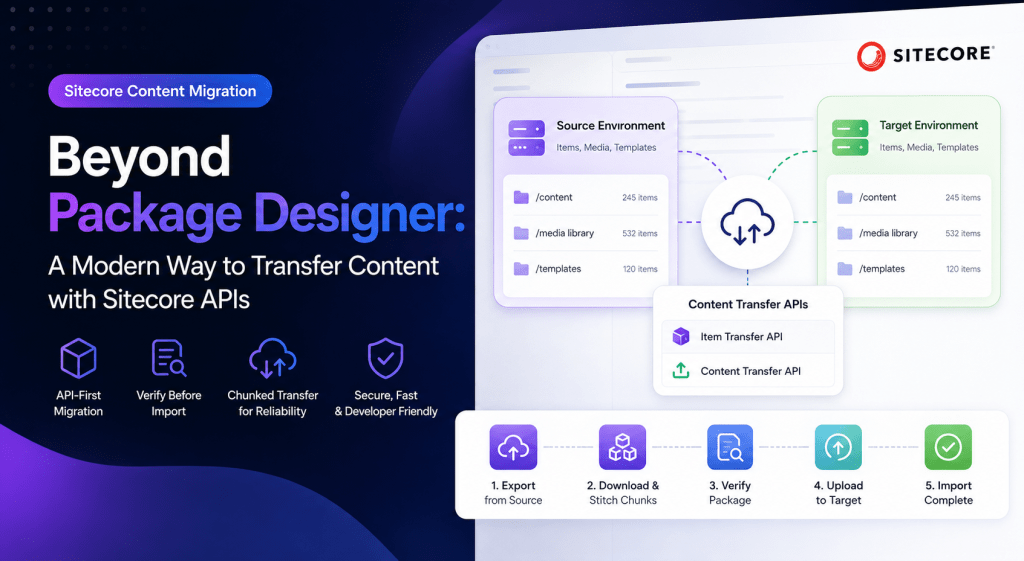
The application acts as a wrapper around Sitecore’s Item Transfer API and Content Transfer API.
The workflow is straightforward:
- Connect to the source Sitecore environment.
- Export the selected content using the Item Transfer API.
- Download and combine the package chunks.
- Review the package details before importing.
- Upload the package to the target environment using the Content Transfer API.
Instead of worrying about multiple API requests, authentication, or chunk handling, everything happens behind the scenes.
Smarter Package Handling
One of the biggest improvements is how large packages are processed.
During export, the application downloads all package chunks and combines them automatically.
During import, the package is split back into smaller chunks and uploaded sequentially. This approach makes transferring large media libraries much more reliable and helps avoid timeout issues.
Verify Before You Import
One feature I felt was missing from the old Package Designer was visibility.
Before importing anything, the application extracts package metadata and displays useful information such as:
- Item paths
- Database information
- Transfer scope
This gives developers a chance to verify everything before making changes to the target environment.
Better Experience for Developers
The goal wasn’t to use the new APIs—it was to make them easier to work with.
The application also includes features like:
- Progress tracking during export and import
- Helpful error messages for authentication issues
- Support for local development environments with self-signed certificates
- A clean interface that removes the need for manual API calls
Instead of spending time writing scripts, developers can focus on moving content safely and efficiently.
Open Source on GitHub
I’ve open-sourced the project so anyone working with Sitecore can use it, contribute to it, or adapt it for their own workflows.
👉 GitHub Repository: sitecore-content-transfer
If you find it useful, feel free to star the repository and share your feedback!
Final Thoughts
As Sitecore continues moving toward an API-first ecosystem, tools like Package Designer are becoming part of the past.
The new Content Transfer APIs provide a much more flexible and scalable way to move content between environments. By building a simple interface on top of these APIs, it’s possible to make content migration faster, more transparent, and much easier for developers.
If you’re working with Sitecore XM Cloud or modern Sitecore solutions, I hope this project saves you some time and makes content migration a smoother experience.


Leave a Reply