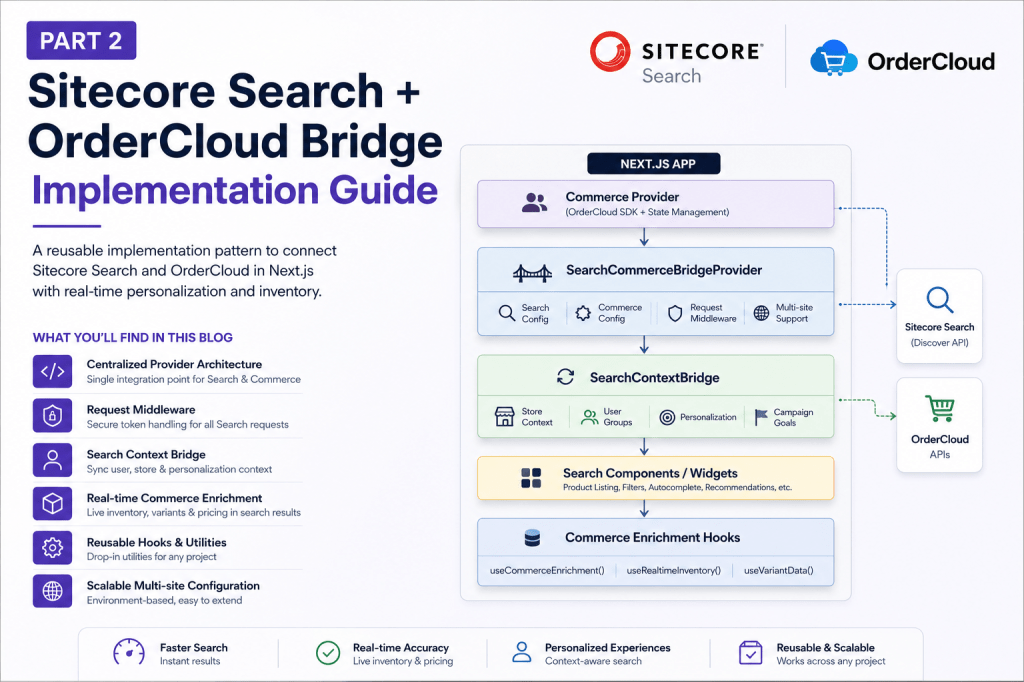
In the first part, we discussed the architecture behind connecting Sitecore Search and OrderCloud through a centralized bridge.
Now let’s look at the actual implementation approach.
The idea was never to build something tightly coupled to a single project.
The goal was to create a reusable pattern that can work across any Search + Commerce implementation.
The Final Setup
Next.js App
   │
   ├── Commerce Provider
   │
   └── SearchCommerceBridgeProvider
           │
           ├── SearchContextBridge
           │
           ├── Search Components
           │
           └── Commerce Enrichment Hooks
Instead of scattering Search and OrderCloud logic across components, everything flows through one centralized bridge.
This made the integration:
- easier to scale
- easier to debug
- reusable across projects
1. The Provider Bridge
The provider layer became the core connection point between:
- Sitecore Search
- OrderCloud
- application state
<SearchCommerceBridgeProvider> {children}</SearchCommerceBridgeProvider>
Responsibilities:
- initialize Search config
- initialize commerce config
- manage auth lifecycle
- inject request middleware
This keeps Search integration logic in one place instead of repeating it across widgets.
2. Centralized Request Middleware
One of the biggest issues in Search pages is that multiple widgets load together:
- product grid
- filters
- autocomplete
- recommendations
Without a centralized approach, all of them can try to refresh tokens at the same time.
So every Search request passes through one shared middleware:
requestMiddleware(() => refreshCommerceSession())
This utility handles:
- token validation
- refresh logic
- anonymous session recovery
The biggest benefit here was stability.
Instead of multiple refresh calls happening together, the entire app shares the same session lifecycle.
3. The Context Bridge
Search becomes much more powerful when it understands commerce context.
The Context Bridge continuously syncs:
- selected store
- user groups
- personalization data
- campaign context
into Sitecore Search.
setStoreContext(storeId)setUserGroups(groups)setCampaignContext(goals)
This enables:
- personalized results
- store-aware inventory
- BOPIS scenarios
- targeted merchandising
without pushing business logic directly into UI components.
4. Real-Time Commerce Enrichment
Search indexes are fast, but inventory and variants can become stale quickly.
So instead of depending entirely on indexed data, we enrich products after Search returns results.
Search Results │ ├── Fetch Inventory ├── Fetch Variants └── Fetch Pricing │ ▼Updated Commerce Results
The important part is that the UI renders immediately first, then gets updated progressively with live commerce data.
That gives a much better balance between:
- speed
- accuracy
- user experience
5. Reusable Utilities
Another important decision was moving shared logic into reusable utilities and hooks.
useCommerceEnrichment()useRealtimeInventory()refreshCommerceSession()buildSearchConfig()
This prevented duplicate logic across:
- search pages
- category pages
- recommendations
- preview search
and made the implementation much easier to maintain.
6. Multisite Configuration
For multisite projects, configuration can become messy very quickly.
A centralized env pattern helped simplify this:
NEXT_PUBLIC_{SITE}_{SERVICE}_{KEY}
Example:
NEXT_PUBLIC_US_SEARCH_DOMAINNEXT_PUBLIC_US_OC_CLIENT_ID
Adding a new site became mostly configuration work instead of architecture work.
Recommended Structure
src/ ├── providers/ ├── bridges/ ├── hooks/ ├── utilities/ └── search/
Simple structure, centralized responsibility.
Final Thoughts
The biggest learning from this implementation was:
Search and Commerce should not behave like two separate systems.
Once both are connected through centralized bridge layers:
- personalization becomes easier
- inventory becomes more accurate
- multisite scaling becomes cleaner
- integrations become reusable
And most importantly, the solution becomes adaptable across different projects instead of being tied to one implementation.
Happy coding 🎉


Leave a Reply