
“Oh no… it’s a 500!”
That all-too-familiar server error shows up and suddenly your site feels broken. The user sees a generic, ugly message — not the best experience, right?
But what if we could handle server errors gracefully, even in a multisite Sitecore JSS + Next.js environment?
This guide walks you through how to build a proper 500 error page setup that works across multiple sites and hosts — using Sitecore JSS, Next.js, and a touch of smart engineering.
🤔 Why Custom 500 Handling Matters
In large-scale multisite projects, an unhandled 500 means:
- A broken user experience
- Lost trust and engagement
- Confusion about whether the site is down completely
Handling server errors gracefully isn’t just good UX — it’s also good for observability, debugging, and future-proofing your app.
Step 1: Create a 500 Page in Sitecore
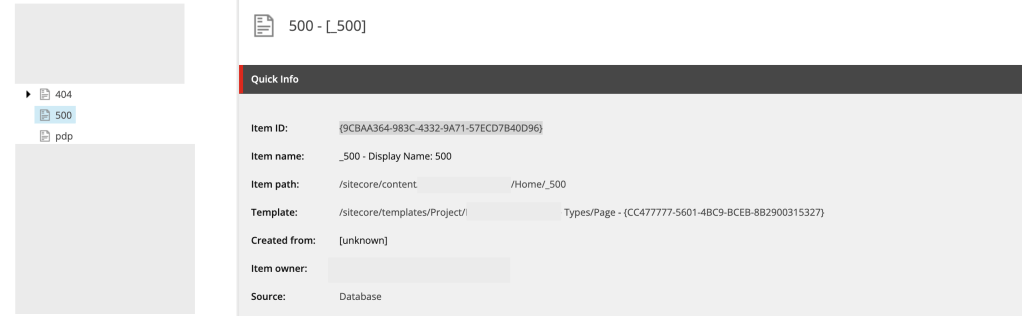
Let’s start by creating a dedicated 500 error page within Sitecore Content Editor.
❗ Note: Sitecore JSS does not allow numeric-only routes like /500. Use a name like _500 instead.
- Create a page under your site’s content tree (e.g.,
/site/pages/_500) - Set the Display Name to “500” (you can set as per the requirement or more content author friendly)
Step 2: Assign the 500 Page in Site Settings
Now that your 500 page exists, link it to the site’s error handling settings:
- Go to your Site Settings item in the content tree
- Scroll to the Error Handling section
- In the Server Error Page field, select the
_500page you created
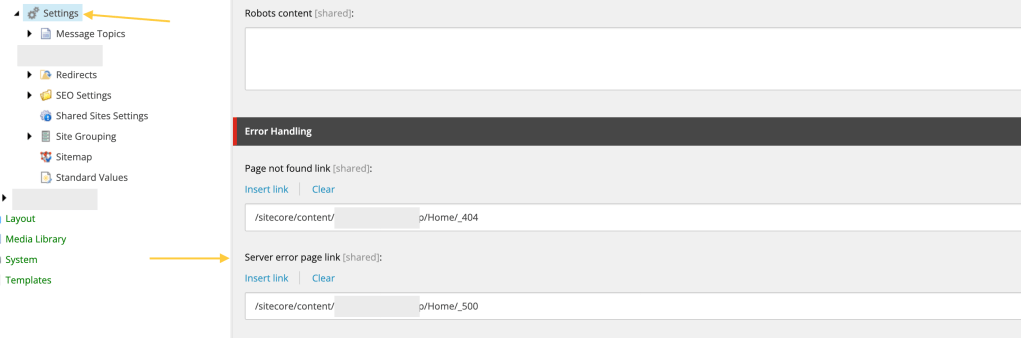
This is the basic setup for error handling from Sitecore side now it’s time to jump on Next Js for further configuration.
Step 3: Handle Multisite Layout Data via API Route
In a multisite environment, we can’t rely on getStaticProps or hardcoded paths. We need to dynamically resolve the layout data for each site’s 500 page based on the domain.
To solve this, create a custom API route to serve 500 page data per site:
pages/api/error/content.ts

content.ts
import {
  ComponentPropsService,
  GraphQLErrorPagesService,
  LayoutServiceData,
} from '@sitecore-jss/sitecore-jss-nextjs';
import { siteResolver } from 'lib/site-resolver';
import { NextApiRequest, NextApiResponse } from 'next';
import config from 'temp/config';

import clientFactory from 'lib/graphql-client-factory';
import { moduleFactory } from 'temp/componentBuilder';
import { sitecorePagePropsFactory } from 'lib/page-props-factory';

/**
 * Gets the ErrorPages content.  We have to fetch via API to be able to get site-specific content.
 */
export default async function handler(req: NextApiRequest, res: NextApiResponse) {
  const domain = req.headers.host;
  let siteName;
  const context = {
    defaultLocale: 'en',
    locale: 'en',
    locales: ['en'],
  };
  // If no store id in cookie, let it grab default in page props factory

  // const rewritePath = getStoreIdRewritePath(, { storeId });
  try {
    const site = siteResolver.getByHost(domain ?? '');
    siteName = site.name;
  } catch {
    siteName = config.sitecoreSiteName;
  }


  const serverErrorData = await sitecorePagePropsFactory.create({
    params: {
      path: [`_site_${siteName}`, '_500'],
    },
    locale: context?.locale,
  });

  try {
    const resultErrorPages = await errorPagesService.fetchErrorPages();

    const layoutService = await new ComponentPropsService().fetchStaticComponentProps({
      context: context,
      layoutData: resultErrorPages?.notFoundPage?.rendered as LayoutServiceData,
      moduleFactory: moduleFactory,
    });

    res.setHeader('CDN-Cache-Control', `s-maxage=60, stale-while-revalidate=${60 * 60}`);

    // Cache settings for the browser.
    res.setHeader('Cache-Control', `max-age=60, stale-while-revalidate=${60 * 60}`);

    res.status(200).json({
      ...props,
      componentProps: layoutService,
      serverErrorData: serverErrorData,
    });
  } catch (error) {
    console.error('Error occurred while fetching error pages');
    console.error(error);
    res.status(500).json({ message: 'An error occured' });
  }
}
What’s Happening?
- Domain-based site detection via a
siteResolver - Dynamically resolves the 500 error page path per site
- Fetches layout data and component props needed for rendering
- Adds smart caching headers for better performance
Now call this API from 500 page.
Step 4: Create 500.tsx in Next.js App
Next, create a custom 500 error page that uses the API route we just built.
pages/500.tsx
import Head from 'next/head';
import Layout from 'src/Layout';
import { componentBuilder } from 'temp/componentBuilder';
import { useEffect, useState } from 'react';
import { SiteName } from 'src/helpers/Constants';
import { sitecorePagePropsFactory } from 'lib/page-props-factory';
import { SitecorePageProps } from 'lib/page-props';
import {
  ComponentPropsContext,
  ErrorPages,
  LayoutServiceData,
  SitecoreContext,
} from '@sitecore-jss/sitecore-jss-nextjs';
import { ComponentProps } from '@sitecore-feaas/clientside/types/headless';

const ServerError = (): JSX.Element => (
  <>
    <Head>
      <title>500: Server Error</title>
    </Head>
    <div style={{ padding: 10 }}>
      <h1>500 Internal Server Error</h1>
      <p>There is a problem with the resource you are looking for, and it cannot be displayed.</p>
      <a aria-label="Go to the Home page" href="/">
        Go to the Home page
      </a>
    </div>
  </>
);

const Custom500: React.FC<SitecorePageProps> = () => {
  const [layoutData, setLayoutData] = useState<LayoutServiceData>();
  const [componentProps, setComponentProps] = useState<ComponentProps>();
  const [fetchError, setFetchError] = useState(false);
  const [componentContextData, setcomponentContextData] = useState<ComponentContextData>({});


  useEffect(() => {
    // Only execute if we didn't get data from the default.
    // Depending on requirements, we may want to always fetch.
    if (!layoutData) {
      fetch('/api/error/content')
        .then(async (res) => {
          // eslint-disable-next-line @typescript-eslint/no-explicit-any
          const data = (await res.json()) as ErrorPages | null;
          // eslint-disable-next-line @typescript-eslint/no-explicit-any
          if ((data as any)?.layoutData) {
            // eslint-disable-next-line @typescript-eslint/no-explicit-any
            setComponentProps((data as any)?.componentProps);
            // eslint-disable-next-line @typescript-eslint/no-explicit-any
            setLayoutData((data as any)?.serverErrorData?.layoutData);
            window.history.replaceState(null, '', '/500');
          } else {
            // There was no custom error page, render the fallback.
            setFetchError(true);
          }
        })
        .catch(() => {
          // There was an error, render the fallback.
          setFetchError(true);
        });
    }
  }, []);

  if (fetchError) {
    return <ServerError />;
  }

  if (!layoutData || !componentProps) {
    return <></>;
  }

  return (
    <ComponentPropsContext value={componentProps}>
      <SitecoreContext
        componentFactory={componentBuilder.getComponentFactory()}
        layoutData={layoutData}
      >
        <Layout layoutData={layoutData} headLinks={[]} />
      </SitecoreContext>
    </ComponentPropsContext>
  );
};
What’s Going On Here?
- The component fetches the 500 page layout dynamically from our API route
- It renders your Sitecore-managed 500 content — with all the branding, components, and context you expect
- If the API fails or data is missing, it gracefully falls back to a hardcoded static message
Tips
- Cache Strategically: Set CDN and browser cache headers for the error API route to reduce load under high-traffic conditions.
- Localization Support: Add locale detection and translation support in both API and client-side rendering.
- Telemetry: Log 500 page hits to Application Insights, Sentry, or another observability tool for better incident tracking.
- Fallback Component: Keep a styled and branded fallback error component for when even your error page fails.
If you found this helpful, let me know or feel free to share your own approach! Happy coding 👨💻👩💻






























 Ravi Vadher