
Overview
This guide explains how to implement and customize 404 error pages in a Sitecore JSS Next.js multisite environment. We’ll cover both the Sitecore configuration and the Next.js implementation.
Sitecore Configuration
1. Create the 404 Page
First, create a custom 404 page in Sitecore Content Editor:
- Navigate to the page section in Content Editor
- Create a new page named
_404(Note: Avoid using “404” as the page name per Sitecore JSS guidelines) - Set the display name to “404”
- Add desired components to the page

2. Configure Error Handling
Configure your site to use the new 404 page:
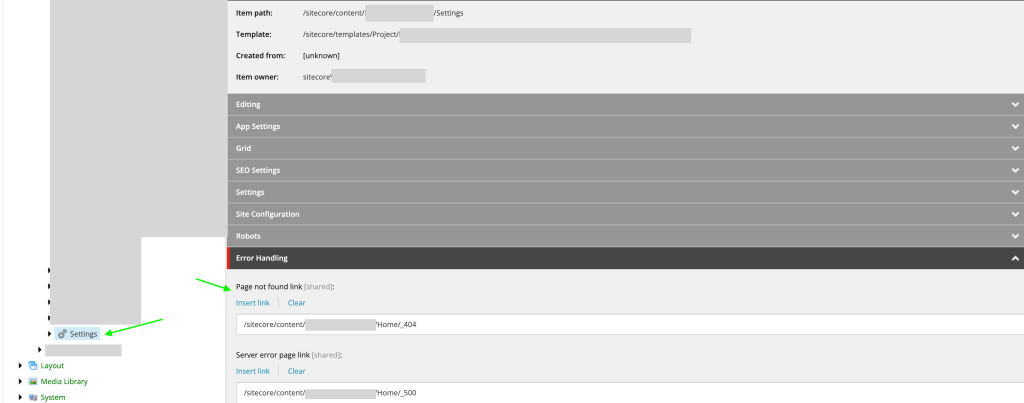
- Navigate to your site’s Settings node
- Scroll to the Error Handling section
- Set the “Page not found” link to your newly created 404 page
- Publish all changes
Next.js Implementation
Basic 404 Page Setup
Create a 404.tsx file in your Next.js app’s pages directory:
import {
  ComponentPropsCollection,
  ComponentPropsContext,
  SitecoreContext,
} from '@sitecore-jss/sitecore-jss-nextjs';
import { componentBuilder } from 'temp/componentBuilder';
import Layout from 'src/Layout';
import { GetStaticProps } from 'next';
import { sitecorePagePropsFactory } from 'lib/page-props-factory';
import { SitecorePageProps } from 'lib/page-props';

type PageProps = SitecorePageProps & {
  data: ComponentPropsCollection;
};

const Custom404: React.FC<PageProps> = ({ layoutData, componentProps }) => {
  // Return static NotFound component if data is missing
  if (!layoutData || !componentProps) {
    return <NotFound />;
  }

  return (
    <ComponentPropsContext value={componentProps}>
      <SitecoreContext
        componentFactory={componentBuilder.getComponentFactory()}
        layoutData={layoutData}
      >
        <Layout layoutData={layoutData} headLinks={[]} />
      </SitecoreContext>
    </ComponentPropsContext>
  );
};

export const getStaticProps: GetStaticProps = async (context) => {
  if (process.env.DISABLE_SSG_FETCH || context?.locale?.toLocaleLowerCase() === 'default') {
    return { props: {} };
  }

  const props = await sitecorePagePropsFactory.create({
    params: {
      path: ['/_404'],
    },
    locale: context?.locale,
  });

  return { props };
};

export default Custom404;
Fallback Static Component
Create a NotFound.tsx component for cases where layout data is unavailable:
import Head from 'next/head';

const NotFound = (): JSX.Element => (
  <>
    <Head>
      <title>404: NotFound</title>
    </Head>
    <div style={{ padding: 10 }}>
      <h1>Page not found</h1>
      <p>This page does not exist.</p>
      <a aria-label="Go to the Home page" href="/">
        Go to the Home page
      </a>
    </div>
  </>
);

export default NotFound;
Multisite Configuration
1. Create API Route for Error Pages
Create pages/api/error/content.ts to handle multisite 404 content:
import {
  ComponentPropsService,
  GraphQLErrorPagesService,
  LayoutServiceData,
} from '@sitecore-jss/sitecore-jss-nextjs';
import { siteResolver } from 'lib/site-resolver';
import { NextApiRequest, NextApiResponse } from 'next';
import config from 'temp/config';
import clientFactory from 'lib/graphql-client-factory';
import { moduleFactory } from 'temp/componentBuilder';

export default async function handler(req: NextApiRequest, res: NextApiResponse) {
  // Get site name based on domain
  const domain = req.headers.host;
  let siteName = config.sitecoreSiteName;

  try {
    const site = siteResolver.getByHost(domain ?? '');
    siteName = site.name;
  } catch (error) {
    // Fallback to default site name
  }

  const errorPagesService = new GraphQLErrorPagesService({
    clientFactory,
    siteName,
    language: (req.headers.locale as string) ?? config.defaultLanguage,
    retries: parseInt(process.env.GRAPH_QL_SERVICE_RETRIES ?? '0', 10),
  });

  try {
    // Fetch error pages content
    const resultErrorPages = await errorPagesService.fetchErrorPages();

    // Fetch component props
    const context = {
      defaultLocale: 'en',
      locale: 'en',
      locales: ['en'],
    };

    const layoutService = await new ComponentPropsService().fetchStaticComponentProps({
      context,
      layoutData: resultErrorPages?.notFoundPage?.rendered as LayoutServiceData,
      moduleFactory,
    });

    // Set cache headers
    res.setHeader('CDN-Cache-Control', `s-maxage=60, stale-while-revalidate=${60 * 60}`);
    res.setHeader('Cache-Control', `max-age=60, stale-while-revalidate=${60 * 60}`);

    res.status(200).json({ ...resultErrorPages, componentProps: layoutService });
  } catch (error) {
    console.error('Error fetching error pages:', error);
    res.status(500).json({ message: 'An error occurred' });
  }
}
2. Update 404 Page for Multisite Support
Modify your 404.tsx to use the new API endpoint:
import {
  ComponentPropsCollection,
  ComponentPropsContext,
  ErrorPages,
  LayoutServiceData,
  SitecoreContext,
} from '@sitecore-jss/sitecore-jss-nextjs';
import { componentBuilder } from 'temp/componentBuilder';
import Layout from 'src/Layout';
import { useEffect, useState } from 'react';
import NotFound from 'src/NotFound';
import { SitecorePageProps } from 'lib/page-props';
import { ComponentProps } from '@sitecore-feaas/clientside';

type PageProps = SitecorePageProps & {
  data: ComponentPropsCollection;
};

const Custom404: React.FC<PageProps> = () => {
  const [layoutData, setLayoutData] = useState<LayoutServiceData>();
  const [componentProps, setComponentProps] = useState<ComponentProps>();
  const [fetchError, setFetchError] = useState(false);

  useEffect(() => {
    if (!layoutData) {
      fetch('/api/error/content')
        .then(async (res) => {
          const data = (await res.json()) as ErrorPages | null;
          if (data?.notFoundPage.rendered) {
            setComponentProps((data as any)?.componentProps);
            setLayoutData(data?.notFoundPage.rendered);
          } else {
            setFetchError(true);
          }
        })
        .catch(() => {
          setFetchError(true);
        });
    }
  }, []);

  if (fetchError) {
    return <NotFound />;
  }

  if (!layoutData || !componentProps) {
    return <></>;
  }

  return (
    <ComponentPropsContext value={componentProps}>
      <SitecoreContext
        componentFactory={componentBuilder.getComponentFactory()}
        layoutData={layoutData}
      >
        <Layout layoutData={layoutData} headLinks={[]} />
      </SitecoreContext>
    </ComponentPropsContext>
  );
};

export default Custom404;
Important Notes
- The
DISABLE_SSG_FETCHenvironment variable must be unset orfalsefor local development to fetch static pages. (when you fetch data using getStaticProps) - The multisite implementation uses an API route instead of
getStaticPropsto fetch layout data based on the hostname. - Cache headers are implemented for browser optimization.
- A fallback static
NotFoundcomponent is provided for cases where the layout data cannot be fetched. - Make sure to publish all Sitecore changes after configuration.
Troubleshooting
- If the 404 page isn’t appearing, verify that:
- The page is published in Sitecore
- The Error Handling settings are correctly configured
- The
DISABLE_SSG_FETCHenvironment variable is not set totrue(when you fetch data using getStaticProps). - The API route is returning the correct data for your hostname

 Ravi Vadher
Leave a comment